Showing posts with label windows. Show all posts

Norton 360 Version 4 – The best Anti-Virus solution till date

As most of you folks already know, I have become a fan of Norton products ever since I started using Norton Internet Security about 6 months back. The new Norton products and solutions have had a radical shift in terms of performance (which I deem very important), features and even the UI. This time round I got hold of a copy of Norton 360 Version 4 – the new kid(version) in the block!!

First things first – Norton 360, as the name truly suggests is a complete 360⁰ solutions that truly runs out of the box from the time you say go (err… install). Norton 360 takes care of all things related to security for your PC / Laptop / Netbook and also takes care of a few more mundane tasks. It is packed with a powerful Anti-Virus, a super smart Fire-Wall, a password safe storage solution and also a auto-backup feature.

Lets deep dive into each of these features separately and the significant improvements that you get with the new Version 4.

Norton 360’s Anti-Virus Solution: One of the most powerful and yet light weight anti-virus solution that I have seen for quite sometime now and it’s getting better. The most useful and exciting feature that I find is called “Live Scan” – this is switched ON by default and runs whenever it finds the computer usage to be idle or low. “Live Scan” automatically determines whether to run a ‘Quick Scan’ or a ‘Full System Scan’. The advantage that I get with this cool new feature is that it runs usually when I’ve left my comp and gone to grab a cup of coffee or catch up on dinner – so no more hassles of setting up a schedule and making sure your comp is up and running for the scheduled scan to run.

I for once have had issues running scheduled scans – missing most of the schedules all the time, setting up a schedule over the weekend or late times of the day means that your machine needs to run over that time to hit the schedule. Now all that looks passé with this very cool and intuitive option. The best part of all this is that the scan magically ends as soon as you once again start using your computer – so you never feel that any of the computer resources have been sacrificed for the scan.

Norton 360’s File Insight Feature: How often do we download .exe’s / setups and what not off the internet – but how do we know that whatever you’ve downloaded is really legitimate and free of any virus, Trojan or root-kit. The later part is taken care by the anti-virus solution but never the legitimacy of the file. You are always left to make the decision yourselves based on the site from which you have downloaded, the person/forum that recommended it, etc – but even for a seasoned internet person like me, it’s quite a daunting task to decide. That’s when you’ve got help in the form of ‘File Insight’ which checks the file against an online database and reveals some interesting facts, let alone whether the file is safe to use/install. It churns out some cool facts such as the number of users who have downloaded/installed the file, safety level of the file and from where you got it to the physical location on your hard-disk that the file resides on. That’s a lot of cool and interesting facts to consider before you make a choice.

Norton 360’s Firewall : This is a very simple and lucid fire-wall solution, nothing much to worry on and it’s so very simple that if you can use your computer for browsing you can configure the firewall too easily. But I guess the default setting that Norton 360 ships out with is more than enough and you don’t really need to tweak any of the configurations frankly speaking. Also Norton's new SONAR (Symantec Online Network for Advance Response) behavioral monitoring system does a good task in combating phishing attacks and real time surveillance of your PC from attacks of the outside work over the network.

Norton 360’s Identity Safe Storage: Quite a cool option to store your usernames and passwords for the sites that you often visit. All the information is safely encrypted and stored. You now need to only remember one master password to access the safe storage.
But, I am really not a very big fan of this solution since it’s not portable really. In the sense, if I happen to use a public computer at a kiosk or over at a friend’s place – I really can’t harness this solution easily. Also, since I’ve become lazy in not typing the password’s each time to login – over a period of time one tends to forget the actual credentials. There must be a better solution for this problem but I can’t think of one that would be truly safe in all scenarios for now.

Norton 360’s BackUp feature: Looks like Norton is slowly consolidating it’s portfolio and that’s really a boon for users like me and you. The backup feature is pretty tidy and easy to setup and use. A few clicks on configuring your backup drive/media and the locations to backup – you should be ready to go. Believe me it’s a very simple process and best of all it’s right out of the box for all practical purposes.

Norton 360’s backup and recovery tool also provides you a free 2GB of online storage space that you can easily backup your important documents and photos. This free Online Backup is simply too cool if you’re out of home/office on a remote country with only a PC connected to the internet (read an airport) - viola you get access to all your backup files right there online.
Also for an extra charge you can easily increase your online backup storage up to 25GB at $69.99 per year. This is a very cool feature that the other backup / anti-virus products like McAfee currently donot do not offer today.

Performance has really been a deciding feature for me to switch over to Norton (this statement looked very very unlikely about 10 months back – if you were to ask me). There is absolutely no reason why you shouldn’t choose Norton 360 over the ample number of products that are out there in the market.

Norton 360 1 PC license costs INR 1795 - but the deal is with the 3 PC license at INR 3200, nowadays most of us have a desktop, laptop and netbook - so it does make sense to have a three license one - these also come with 2GB of online storage space. The premium edition includes 25GB of online storage space and a three PC license, the suggested retail price is INR 4025. Both - standard and premium editions of Norton 360 includes a one-year service subscription to use the product and receive Symantec’s protection updates. All Norton 360 users with a valid product subscription are eligible to receive the latest product updates via the subscription service model.

Norton 360 not only protects your computer but also tunes up your system for the best performance like doing a disk defragmentation or fixing driver issues and also backs up essential files – all in the background (now that’s the icing on the cake). The list of features and the great value for money that it provides is simply endless – as I started off this review, it’s truly an out-of-the-box solution where you deploy and completely let it take care of everything – all in the background.

Finally we have a Steam client for Mac for FREE from Valve

Valve has finally managed today to rather officially give us the Steam client for Mac. This is simply some superb news for Mac users since they get the 'free to play' Portal game and also a vast library of 63 games too for the Mac platform.

Valve says that in order to celebrate the Mac launch, it will be giving away free copies of Portal to anyone who downloads Steam between today and May 24, 2010. Here is the direct link to download your Steam for Mac. For all the existing steam users who don't still have a copy of the game yet they can simply click on the install button on the game's Store page to get it now!!.

Steam being pushed into the Mac platform will surely open loads of opportunities for Valve. Valve can now easily expand the current customer base for its games distribution service. This announcement is significant since most of the hardcore gamers on Mac used to play all the steam titles only by using Windows OS via Bootcamp, but that's not needed anymore.

Here's this week's titles which are available on Steam Play:
  • And Yet It Moves
  • Atlantis Sky Patrol
  • Bejeweled 2 Deluxe
  • Bob Came in Pieces
  • Bookworm Deluxe
  • Braid
  • Brainpipe
  • Chocolatier: Decadence by Design
  • Chuzzle Deluxe
  • City of Heroes: Architect Edition
  • Civilization IV: The Complete Edition
  • Cooking Dash
  • Diaper Dash
  • The Dig
  • Diner Dash: Hometown Hero
  • DinerTown Detective Agency
  • DinerTown Tycoon
  • Dream Chronicles: The Chosen Child
  • Escape Rosecliff Island
  • Fairway Solitaire
  • Fitness Dash
  • Football Manager 10
  • Galcon Fusion
  • Gemini Lost
  • Guns of Icarus
  • Hotel Dash Suite Success
  • Indiana Jones and the Fate of Atlantis
  • Indiana Jones and the Last Crusade
  • KrissX
  • Loom
  • Luxor
  • Luxor 3
  • Luxor: Mahjong
  • Machinarium
  • Mahjong Roadshow
  • Max and the Magic Marker
  • My Tribe
  • The Nightshift Code
  • Nightshift Legacy: The Jaguar's Eye
  • Parking Dash
  • Peggle Deluxe
  • Peggle Nights
  • Portal
  • Professor Fizzwizzle and the Molten Mystery
  • Quantz
  • Sam & Max: The Devil's Playhouse
  • Tales of Monkey Island Season 1
  • Toki Tori
  • Torchlight
  • Trijinx: A Kristine Kross Mystery
  • Unwell Mel
  • Valarie Porter and the Scarlett Scandal
  • Wandering Willows
  • Wedding Dash 2: Rings Around the World
  • World of Goo
  • Zenerchi
  • Zuma Deluxe

Complete list of Best and Free Anti-Virus for your Windows 7 :: Updated on May 2010

Though you may have one of the best operating system's in your computer - a.k.a. Windows 7, you will still need a good anti-virus program to protect your PC from Viruses, Trojans, Root-Kits, etc. There are several paid Anti-Virus solutions from Norton (Symantec), Mc-Afee, etc but when you have a personal PC or laptop and can't really afford spending any more on softwares - well, look at the Free Anti-Virus solutions.

Free Anti-Virus softwares are actually second to none in terms of protection but they lack functionality and a few bells and whistles found exclusively on paid Anti-Virus softwares.

I have put together a list of the Best Free Anti-Virus Solutions that are available currently.

As for the paid Anti-Virus, the Best detections rates are found in these:
  • Symantec Norton
  • Avira AntiVir
  • Panda
  • Avast
  • Sophos

Go ahead and protect your data - choose a Anti-Virus solution wisely and don't forget to update it often!!

How to disable Microsoft Windows Genuine Advantage Notifications - using the Free RemoveWGA

>For those of you who are wondering how to disable or simply remove the Microsoft Windows Genuine Advantage Notifications - You have help at hand in the form of a cool tool called RemoveWGA. Though you must already be aware that removing the WGA from your Windows copy amounts to piracy by Microsoft's term.

But at times you may have a genuine reason as to why you want to turn off the Windows Genuine Advantage Notification, in such cases Microsoft doesnot help you with any tool right away. This is where RemoveWGA comes into picture. This is a very simple and easy to use tool that allows you to remove the WGA protection in your copy of Windows.

I would like to once again stress that removing WGA from your Windows XP or Windows Vista or Windows 7 amounts to you having a pirated copy of Windows. So thread in caution when you try this out. Your on your own and i don't assume any responsibility.

Now after all that long disclaimers - where do you get a Free download of RemoveWGA you may ask? Well, head over to the software database at Softpedia and you can find it easily.

How to install Windows 7 from a .iso without burning onto a DVD

Windows 7 doesnot allow you to install off the same Hard Disk. But if you didn't want to burn the .iso image of Windows 7 that you downloaded to a new DVD - you can still install it off the .iso file by using the method below.

You will need a portable hard disk / pen drive though.

Incase, you have a portable hard disk or a pen drive - do the following :
1. Get WinRar (www.rarlabs.com) and install the software on your machine. WinRar is similar to winzip but supports many other formats including .iso.
2. Extract the .iso of Win7 to your pen drive / portable hard disk. Place the extracted files into the root of the drive - your other data can be put into folders.
3. Restart your laptop and hold F9 / F2 to enter into boot-menu which gives you a choice to load from. Here select your pen-drive / portable hard disk - usually a USB device.

Done - that's all it takes. You can now go ahead with the normal install process.

Transform Windows XP into Windows 7 within 5 minutes

Windows 7 provides lots of new features along with a newly designed interface. It looks very similar to Windows Vista but there are many GUI changes like redesigned taskbar, Explorer, new boot screen and login screen, etc.

If you are still using Windows XP but want to enjoy the new Windows 7 look, then this tutorial will definitely help you.

After following this tutorial, you'll get the same Windows 7 look in your Windows XP. Following is a list of things which are going to change after following this tutorial:

* Windows Theme or Visual Style
* Icons
* Boot Screen
* Login Screen or Welcome Screen
* Cursors
* Taskbar
* Wallpaper
* Progress Dialog Box
* Shutdown / Log off Dialog Box
* About Windows Box
* System Properties Dialog Box
* Volume Control Window
* Extras like "Aero Shake", "Aero Snap", "Aero Peek", "Calculator" and "Paint"
* A Few Other Mods...

So here we start our transformation tour:

1. Windows Theme or Visual Style:

Windows 7 provides a new refreshing look which includes redesigned taskbar and start menu, Windows Explorer and a few other small changes.

You can get the same look in Windows XP by using following theme:


Theme Download Link
How to Use :
1. Once you download the ZIP file, extract it. You'll get a folder "SevenVG RTM Theme for Windows XP".

2. In this folder, you'll get 5 more folders:

* Extra Common Tasks (This folder contains 2 extra shell styles: Bottom and Left dark blue.)
* Fonts (This folder contains Segoe UI fonts required for the theme. Run Fonts.exe file to install them.)
* Iconized Taskbar Hack (This folder contains registry script to enable Iconized taskbar in Windows XP.)
* Styler Toolbar (This folder contains "Styler" setup file and "SevenVG RTM" Styler skin. You can apply it to get Windows 7 look-like commandbar in Windows XP Explorer.)
* Theme (This folder contains the main theme. Run Theme.exe file to install it.)

3. Run "Theme.exe" file present in "Theme" folder and apply the theme using Desktop Properties.

4. Also make sure you have patched the "uxtheme.dll" file to be able to use 3rd party themes in Windows. If its not patched yet, download and run UXtheme Patcher using following links:

Since Windows XP SP3 Final version has been released, most of the people are using it in their systems. If you are also using SP3 in Windows XP and unable to use 3rd party themes, then download this new UXtheme Patcher:

Download Windows XP SP3 UXtheme Patcher

Run the EXE file and click on "Patch" button. It'll take a few seconds and then you can restart your system to take effect.

This patcher works in SP3 RTM version only. If you are using SP3 Beta or RC version, then I'll advise you to not use this patcher. You can download the required patched "UXtheme.dll" file from following link and then copy it to "%windir%\System32" folder using "Replacer":

Download Patched UXtheme.dll File for XP SP3

Download Patched UXtheme.dll File for XP SP2


2. Icon:

You can get Windows 7 icons in XP using "SevenVG Icon Pack":

Download SevenVG IconTweaker Pack

More Info

After downloading the file, extract it and you'll get a folder containing the Icon Pack. You'll need "IconTweaker" to apply this icon pack which is free and included in the ZIP file.

First install "IconTweaker", then double-click on "SevenVG Icon Theme.itt" file. It'll open IconTweaker window, click on "Apply" button to apply the new icons.


3. Boot Screen:


Windows 7 contains a new animated boot screen which shows animated items/balls that come together to form Windows logo.

You can get a similar boot screen in Windows XP:


You can download the boot screens using following links:

Download Windows 7 Beta Boot Screen for Windows XP

Download Windows 7 Beta Boot Screen for Windows Vista


You'll need "Tuneup Utilities" to apply these boot screens.
NOTE: The above boot screens are not animated.


4. Login Screen or Welcome Screen:

Windows 7 login screen looks similar to Vista login screen except the new background image and the text displayed at bottom.

You can download it using following link:

Download Windows 7 RC Login Screen for XP

More Info

After downloading, extract the ZIP file using WinZip, WinRAR or 7-zip and look for the "LogonUI.exe" file. That's the file which contains the login screen. You'll need to replace existing "logonui.exe" file present in "%windir%\System32" folder with this downloaded one. Use "Replacer" to replace the file which you can find in our "Downloads" section.

You can also use Tuneup Utilities to easily apply the login screen which is very safe.

Norton Internet Security 2010 (NIS 2010) – Complete Review

NIS 2010 jsbi Regular readers of my blog know that I am not a fan of Norton products since the are sluggish and consume a lot of resources. But wait a sec – that was my opinion from ages. Shouldn’t they have improved now? recently when I got my Acer Aspire D250 netbook it came with McAfee installed but that was no good for me. Getting back to Norton, I wanted to really check out their new offerings and see how they have improved when you have many free and fast anti-virus solutions in the market like AVG, AVAST, etc.

NIS 2010Norton has a slew of 3 products lined up – Norton 360 (a complete suite that has all the solutions), Norton Internet Security 2010 (more targeted for Internet Users) and the plain vanilla Norton Antivirus.

I got myself Norton Internet Security 2010 popularly known as NIS, since it boasts to offer complete protection and yet not compromise on performance. It is one of the lightest protection solutions available currently and that makes it much more interesting. Norton Internet Security currently supports Microsoft Windows XP, Windows Vista and Windows 7 – all 32-bit and 64-bit versions. Now this is where it got me interested since my home PC was loaded a few weeks back with Windows 7 64-bit – I was really out there looking for a next gen Anti-Virus for it.

Something that got me interested in Norton Internet Security 2010 was that it uses a new security model. This new security model helps NIS to attain unmatched levels of detection of new malwares. What the new security models does really is that it uses cloud-based intelligence to identify malware in an entirely new which is simply ages ahead of the traditional way of using signatures and behavior-based detection. The new security model also features a real-time reputation system that tracks files and applications and dozens of their attributes such as their age, download source, digital signature, and prevalence(more about this feature in detail later).

First of all – installing NIS was a breeze, except for the 60MB update that it needed to download off the internet.3But belive it or not - I had NIS working on PC in less than a minute flat!!! (excluding the 60MB download). This feat by Symantec is simply commendable.

The NIS 2010 interface is all re-vamped and so fresh to look at.11
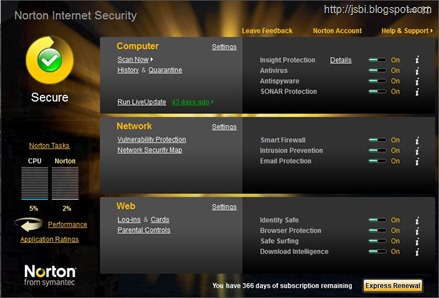
It has 3 very distinct partitions – Computer, Network and Web. Well, these are the only there layers for which we need protection.

  • Computer : This has the anti-virus solution which has many new features like enabling of system scan when computer is idle. Also the idle time can be easily set by the user – now this is really a wow for a geek like me. Gone are the days when I had to schedule scans in my PC at mid-night and let my PC run through the night. Now, the scan happens even when I get off my comp to grab a cup of coffee (coz I have my idle time to be 3 mins – 3 mins is too much of an idle time for a geek like me if I am near the comp).
    It also features something called as SONAR 2 (Symantec Online Network for Advanced Response) which is a 2nd generation system that harnesses all elements of NIS 2010 to make really sophisticated and clever decisions about what to trust and what to convict as a threat or risk. Again, to do this it leverages data from the cloud, network communications and file attributes such as location on the PC, origin information, etc.
  • Network : NIS 2010 is not just an Anti-Virus but more of a complete security suit and this is further testimonial to it having a Smart Firewall which repels any possible attacks and also constantly monitors the traffic flow to determine any threat. Intrusion prevention is a key here and also has in-build e-mail protection that helps prevent your PC being used as a botnet by spammers.
  • Web : Finally the web. Norton IdentitySafe provides one-click log-ins and automatic form filling to prevent key loggers from stealing your information. Norton Safe Web adds additional protection when you search, shop, and surf the web to stop Internet threats before they can infect your PC. Safe surfing is always the key and this is easily achieved by NIS 2010.

Here’s a small test that I subjected Norton Internet Security 2010 to and it came out with flying colors. I had a exe which was infected with a trojan on my PC. I unassumingly like a lay-man double clicked the exe. This is what came up.15Went ahead and clicked on More Details and this popped up. 16

I was simply amazed at the kind of information that NIS 2010 threw back at me. It picks up information off the cloud and display some very vital statistics like how many people have used this exe and what kind of threat level it carries. This helps me to make a informative decision on whether to go ahead or not (Though it won’t allow me to execute the file – but even before that giving this kind of info is really handy).

Norton Internet Security also comes with a Task Manager – not the plain Windows kind of one, but this is a hybrid one which clearly lets you analyze your system performance over a period of time in time-slices. Important installations can be easily tracked and even tasks that have consumed more CPU or memory can be easily tracked down.18

Some of the advantages of using NIS 2010:

  • The fastest, lightest security suite you can buy for award-winning protection that won’t slow you down or get in your way.
  • Installs faster than any other security suite.
  • Boots faster than any other security suite.
  • Scans faster than any other security suite.
  • Uses less memory than any other security suite.
  • Doesn’t impact your PC’s speed when you copy or edit files, install applications or download files.

What I would like NIS to improve upon is provide a full fledged Widget for Vista / Windows 7 users rather than the signal light widget that we have now 12 this only lets us know how secure or vulnerable the PC is. But having an option for a full fledges widget would be a really nice add-on.

The pricing of Norton Internet Security 2010 in India is very competitive and also much below (or in-line) with other Anti-Virus vendors. The suggested retail price for Norton Internet Security 2010 is Rs 2,495 for a three PC license(great for a Home Network like mine), and Rs 1,450 for a single PC license. You can easily purchase it at the Symantec online store www.in.symantecstore.com

Asus SaberTooth 55i motherboard - A complete Review

ASUS has long been the leader in providing innovative motherboard solutions. Once again it has taken the lead by launching today the first "TUF" (The Ultimate Force) Series of motherboard called the SABERTOOTH 55i. As the name suggests the TUF Series has been specially developed for the heavy computing of geeks and also perform very well under extreme conditions (read - over-clocking).

Geeks have always had a desire for high-quality motherboard components and also the need for very stable computing platforms, and this seems to have achieved uncompromising stability with the new TUF Series motherboards.
Asus has claimed that the SaberTooth 55i motherboards have even passed the most demanding military-style testing and yet even in the harshest operating conditions they have been able to deliver robust performance.

The SaberTooth 55i motherboard is designed around what is known as a "Marine Cool" concept which incorporates the Intel® P55 chipset and also the all new "tough" features to give users a supremely solid and stable computing platform.
SaberTooth 55i motherboard employs What is known as the unique CeraM!X microfin coating and also military level tested capacitors and VRM MOSFETs to give users increased operational stability.

More about the unique Ultimate Heatsink Cooling system with CeraM!X Microfin Coating
SaberTooth 55i motherboard comes with the new CeraM!X heatsink which easily delivers exceptional cooling to active components and also gives uncompromising system stability even under intense operating conditions. SaberTooth 55i motherboard's advanced ceramics-based composition is something that is commonly used in the aerospace industry for heat insulation. This new heatsink dissipates heat rapidly to achieve ultimate cooling. Ceramics have replaced the traditional anti-oxidant compounds to create a microfin surface texture for enhanced cooling. This rough surface offers an expanded area for heat induction into the surrounding air. As a result, more heat is rapidly conducted away from the active system-allowing users to enjoy previously unattainable levels of stability.

Direct Memory Cooling with Affordable CoolMem! Fan Frame SaberTooth 55i motherboard realises the need for an optimal memory operation - which squarely relies on good cooling. SaberTooth 55i motherboardhas the CoolMem! Fan Frame that can easily enclose most standard 40mm or 50mm computer fans and also fits them directly over the memory module. So you can gain an affordable cooling solution that significantly stabilizes memory operation.

Resilient Performance from Military-certified Capacitors and MOSFETs
SaberTooth 55i motherboard ensures users to experience uncompromising performance by incorporating only high-grade, rigorously-tested components. These perform robustly even under the most demanding conditions. Take for example, all its capacitors have undergone thermal shock tests to ensure continuous, stable operations during rapid temperature changes in the 60°C range. In fact, all its capacitors and VRM MOSFETs have been certified for military-level use through stringent testing.

Optimized Power Use with E.S.P.
SaberTooth 55i motherboard delivers E.S.P. (Efficient Switching Power) to all major components for superb system efficiency. Besides delivering efficient power to the CPU and memory, the power design also applies the same level of efficient power to the PCIex16 expansion slots and IC. This improves overall power efficiency and reduces the amount of heat generated-resulting in cooler and more reliable operations. Additionally, the E.S.P. converts power at 90% efficiency compared to a conventional linear design that is only about 60% efficient. Built for robust performance, the SABERTOOTH 55i-and ASUS TUF Series motherboards as a whole-incorporates the latest breakthroughs in heatsink composition and high-grade, military-tested components to enable users to build their DIY systems around one of the most solid and stable motherboards ever created.

Here are the detailed Specifications of SaberTooth 55i motherboard
  • CPU - LGA1156 socket for Intel® Core™ i7/Core™ i5 Processors
  • Chipset - Intel® P55 Express (Supports Intel® Turbo Boost Technology)
  • Memory - 4 x DIMM, max. 16GB, DDR3 2000/1800/1600/1333/1066MHz, non-ECC, unbuffered memory Dual channel memory architecture. Supports Intel® Extreme Memory Profile (XMP)
  • Expansion slots - 2 x PCI Express 2.0 x16 slots (single at x16 or dual at x8/x8 mode)
    - 3 x PCI Express 2.0 x1 (2.5GT/s)

    - 2 x PCI
  • Multi-GPU - Supports both NVIDIA® Quad-GPU SLI™ Technology and ATI® Quad-GPU CrossFireX™ Technology
  • Storage - Intel® P55 Express Chipset
    - 6 x SATA 3.0 Gb/s ports (black)

    - Intel Matrix Storage Technology supports RAID 0, 1, 5 and 10

    JMicron® JMB363 SATA & PATA controller: - 1 x Ultra DMA 133/100/66 for up to 2 PATA devices

    - 1 x External SATA 3Gb/s port (SATA On-the-Go)

    JMicron® JMB322 (DriveXpert Technology) : - 2 x SATA 3.0 Gb/s ports (orange and white )

    - Supports EZ Backup and SuperSpeed functions
  • LAN - Realtek® 8112L PCIe Gigabit LAN controller featuring AI NET2
  • Audio - VIA® VT2020 10-channel High Definition Audio CODEC
    - Absolute Pitch BD192/24 featuring ENVY HD

    - DTS Surround Sensation UltraPC

    - Supports Jack-Detection, Multi-streaming, Front Panel Jack-retasking

    - Optical S/PDIF out port at back I/O

    - ASUS Noise Filter
  • USB / IEEE1394a - 14 x USB 2.0 ports (6 ports at mid-board, 8 ports at back panel) VIA® 6308P controller supports 2 x IEEE 1394a ports (one at mid-board; one at back panel)
TUF Exclusive Features
Power Design 12-phase CPU Power, 2-phase Memory Power, 2-phase VTT_CPU Power, Efficient Switching Power Design for 3VSB/1.8V/1.05V, TUF Capacitors and MOSFETs (certified military-standard)

Thermal Solution CeraM!X Heatsink Coating Tech, CoolMem! Fan Frame, T.Probe Technology, ASUS Fan Xpert

Guardian feature MemOK!, DriveXpert, ESD Guards, EMI Eliminator

Form Factor - ATX Form Factor, 12 inches x 9.6 inches ( 30.5cm x 24.4cm ). It's also a Windows 7 certified MotherBoard - now don't ask me what that means.

How to easily convert .ppsx file to .pptx or .ppt?

Well, a .ppsx file is a Power Point Show file created in Microsoft Office 2007 or later. Today at office I received one such file and double clicking it launches the Powerpoint Viewer and Not on PowerPoint. This maybe needed if you want to edit a few slides or copy some information from the slides.

I searched online for quite sometime with no luck. For the earlier .pps files, they can be easily converted to .ppt file by merely renaming the file extension to .ppt from .pps. But this technique doesnot work with the new versions - so a mere renaming of a .ppsx file to .pptx throws up an error when you try to open the file.

Then an idea struck me and it worked beautifully.
  • Open Microsoft PowerPoint.
  • Click on the Ribbon and Open.
  • Now select and open the .ppsx file.
Viola - you have now opened the .ppsx file in edit mode and can now save it in either .pptx or .ppt formats too within Microsoft PowerPoint.

Related Articles :

Like it or not iPhone currently commands 50% of WorldWide smartphone web traffic

AdMob Which reports on web requests on more than 15,000 web sites and applications world wide has some very stunning news in it's October release. Apple's iPhone is the most popular Smartphone OS in the world and it sweeps a whooping 50% of all mobile web traffic. Symbian OS has a 25% share which is very closely followed by a very new entrant - Google. Yes, the Google's Android OS seems to direct in 11% of the mobile web traffic out of Smartphones and that's really very impressive.

So, where's WinMo you may ask? Well, it currently has only a mere 3% of the SmartPhone Web Traffic. Do note that this not all the mobile web traffic we are talking about but only specific to SmartPhones. Let's put it this way - there aren't so many WinMo SmartPhones that have taken up well with the users. On the other hand, iPhone has entered several markets WorlWide and has consolidated a very nice marketshare in the very competitive SmartPhone market. The iPhone has been available atleast in the US for almost 2.5 years now - but taking 50% of the Worldwide traffic of smartphones is very impressive.

Some very interesting news related to Android again is that the newly launched Motorola Droid which runs only on Verizon in US currently has already managed to capture 24% of all Android traffic in US in the last few weeks!!.

The upcoming holiday season is surely going to tilt in favor of the new slew of Android phones and also more folks picking up the impressive iPhone 3GS. Stay tuned for more updates in this space.

VMLite the best alternative for running Windows XP in your Windows 7

Well, when Windows 7 was released there was one very nice feature which was much talked about by the geeks and that was the Windows XP Mode. Well, Windows XP Mode is part of a seperate installation by which you can run Windows XP on your Windows 7.

But the catch was that in order to use Windows XP mode Microsoft made it mandatory that you must be running Windows 7 Professional or Windows 7 Ultimate - also your PC must have virtualization support by the hardware.

These mandatory requirements was a downer and many users weren't able to truly enjoy Windows XP Mode. But here some very good news - enter the VMLite which is a very nice alterative to Microsoft's Windows XP Mode.


VMLite XP Mode does offer very similar features like the Microsoft XP Mode but lo it doesn't need you to have Windows 7 Professional or Windows 7 Ultimate - so even Windows 7 Starter edition will work fine and also it doesn't require hardware virtualization.

VMLite allows you to easily run Windows XP from your desktop running on a different host operating system - not just Windows 7. You can download VMLite here.

Microsoft Office 2010 Beta 2 Leaked (Build version 14.0.4514.1007 ) with the Keys

Yes, the much anticipated Microsoft Office 2010 suite has already been leaked on many peer-to-peer(torrent) file sharing websites/networks. This is the Beta 2 release featuring a Build version 14.0.4514.1007.

The build which has been leaked last week is said to install with the Office 2010 Technical Preview keys and no new keys are needed. So the keys are available here.

Here are some very exclusive screen shots running the Microsoft Office 2010 on my Win 7 RC 1 as you can very well see the UI has been polished and so also the program icons. The public beta is expected to be out by early next week.

Office 2010 runs on Windows XP SP3, Windows Vista and of course the brand new Windows 7.

Here are the exclusive Screenshots of Office 2010 Beta 2 (Build version 14.0.4514.1007)


Simple tips to get the most out of your Online Meetings

Online meetings are inarguably the most price-less tool for saving people's time and money in a very aggressive and competitive business environments that we see today. But did you know that most online meetings tend to have a sour experience in the host as well as the presenter's minds mainly due to poor training or unpreparedness of both - either the presenter or the host.

So here are some very simple and most effective methods to achieve the most of Online Meetings:

1. Always make sure that the Online Meeting is short and to the point - crisp. Always make sure that No online meeting ever exceeds more than an hour or in some cases even thirty minutes.

2. Always make sure that you have already prepared a slip containing the list of all probable questions that you will ask those attending the online meeting. Always remember that asking questions helps you retain everyone’s attention.

3. Before you start off - remember to inform the other participants to keep their questions to the end of the online meetings. There should be a very high probability that you will answer most of the questions that the audience thought off during your regular presentation.

4. Mail out the attendees well in advance to install and test the online web meeting software ahead of the schedule. Also, they can check the audio setup and the microphone setup too.

5. It is important in a web meeting that you have a very optimized copy of the PowerPoint slides such that the .ppt / .pptx file is less than 2 MB in size. This greatly helps the attendees not to experience a time lag as you flip through the slides.

Hope these tips helped you. Do share your tips/experiences on online Meetings too.
Related Posts Plugin for WordPress, Blogger...